


SixStringFan
Registrierter Benutzer
- 28.10.26
- 29.05.22
- 2.053
- 13.160
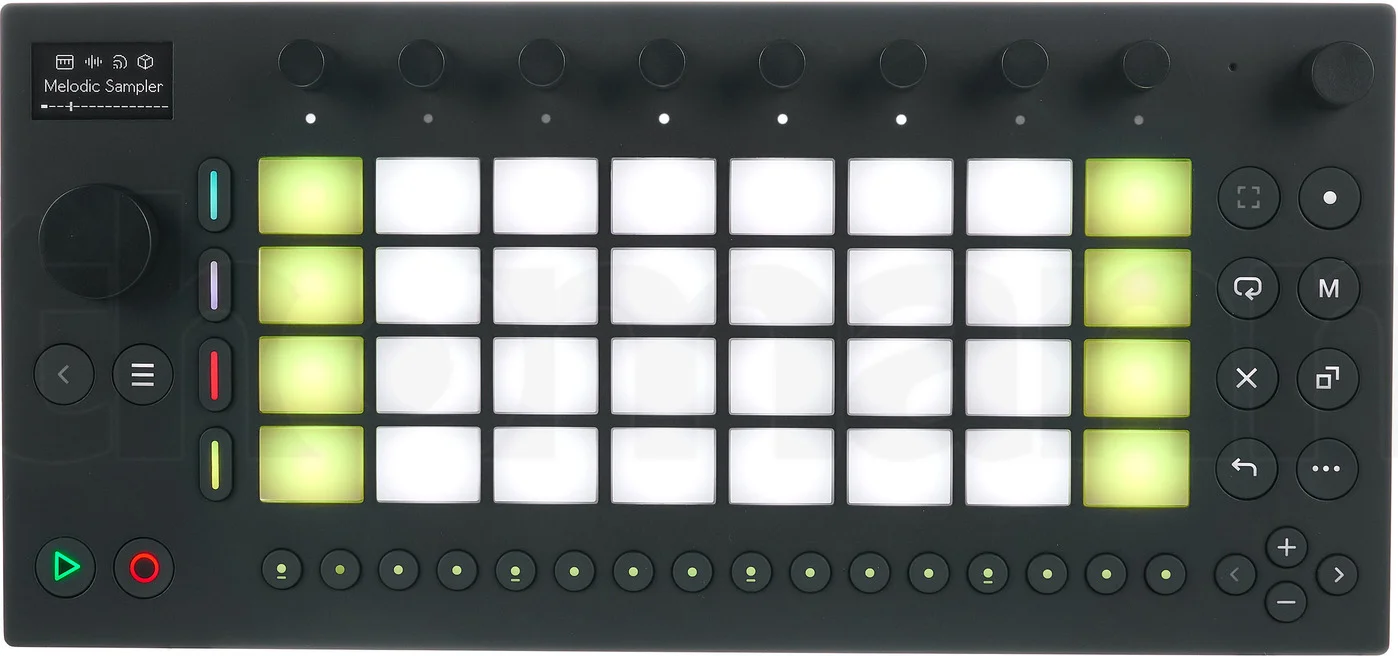
Hallo Zusammen da mich ein paar Leute angeschrieben haben die sich für den Ableton Move* interessieren will ich hier mal meine Erfahrungen mit dem Groove Controller mit euch teilen.

 www.thomann.de
Wie bin ich zu dem Gerät gekommen:
Vor ein paar Monaten habe ich im Netz nach Open Source Geräten mit NAM-Support gesucht, in einem Forum hat jemand berichtet das er für seine Gitarrensounds den Ableton* Move Controller verwendet da es für diesen einen Community Eweiterung "Move Everything" von Charles Vestal gibt in der auch NAM mit dabei ist.
Welche Module gibt es bisher:
In der Zwischenzeit hat sich der Name der Erweiterung geändert und aus "Move Everything" ist jetzt "Schwung" geworden. Die Module die es mittlerweile aus allen Bereichen dafür gibt sind Open Source und da gibt es jede Menge coole Sachen zu entdecken u.a. gefällt mir der Soundgenerator "Radio Garden" sehr gut damit lassen sich die Weltweiten Radio Station nach Soundclips durchforsten und in seine Songs später einbauen.
Wo finde ich eine Auflistung der einzelnen Module:
Eine gute Übersicht der vielen Module kann man hier finden.
Wie funktioniert die Installation von "Schwung":
Die Installation von Schwung für alle Systeme (Win,Mac,Linux) findet man auf GitHub ich habe Linux dafür verwendet.
Ist es gefährlich für das Gerät diese Erweiterung zu installieren:
Ich benutze Ableton* Move jetzt seit April und Ableton* ist sehr wohl bewußt das "Schwung" sehr beliebt und auch verkaufsfördernd für den Groove Box Controller mittlerweile geworden ist. Nach jedem Update der Move Orginal Firmware muß man Schwung reaktivieren das ist aber kein großer Akt und hat bei mir bisher zu keinen Problemen geführt.
Wie ist die PC-Anbindung des Move Controllers:
Wie nicht anders zu erwarten funktioniert Move noch am besten mit der Ableton* eigenen Software eine Ableton* Live Intro Version gehört sowieso zum Lieferumfang des Controllers. Da ich auch mit Fender Studio Pro arbeite ist es im Prinzip zwar möglich den Move Controller damit zu verbinden aber ich bevorzuge eher diese Lösung um Songs zwischen beiden DAWs auszutauschen.
Falls ihr noch Fragen habt könnt ihr sie gerne hier posten ich werde dann versuchen sie so gut es geht zu beantworten. Eventuell gibt es ja noch andere User die den Controller benutzen und Anregungen und Tips haben, ich bin gespannt was ihr mit dem Teil schönes anstellt.
Grüße Tom
* 🎹 Ableton Move
Ableton Move; portables Musikproduktionsinstrument; intuitives, tragbares und eigenständiges Instrument zum spontanen Umsetzen kreativer Ideen; mobil, vielseitig und flexibel nutzbar dank integriertem Akku, Audiointerface, Mikrofon und Lautsprecher;...
499,00€
www.thomann.de
Wie bin ich zu dem Gerät gekommen:
Vor ein paar Monaten habe ich im Netz nach Open Source Geräten mit NAM-Support gesucht, in einem Forum hat jemand berichtet das er für seine Gitarrensounds den Ableton* Move Controller verwendet da es für diesen einen Community Eweiterung "Move Everything" von Charles Vestal gibt in der auch NAM mit dabei ist.
Welche Module gibt es bisher:
In der Zwischenzeit hat sich der Name der Erweiterung geändert und aus "Move Everything" ist jetzt "Schwung" geworden. Die Module die es mittlerweile aus allen Bereichen dafür gibt sind Open Source und da gibt es jede Menge coole Sachen zu entdecken u.a. gefällt mir der Soundgenerator "Radio Garden" sehr gut damit lassen sich die Weltweiten Radio Station nach Soundclips durchforsten und in seine Songs später einbauen.
Wo finde ich eine Auflistung der einzelnen Module:
Eine gute Übersicht der vielen Module kann man hier finden.
Wie funktioniert die Installation von "Schwung":
Die Installation von Schwung für alle Systeme (Win,Mac,Linux) findet man auf GitHub ich habe Linux dafür verwendet.
Ist es gefährlich für das Gerät diese Erweiterung zu installieren:
Ich benutze Ableton* Move jetzt seit April und Ableton* ist sehr wohl bewußt das "Schwung" sehr beliebt und auch verkaufsfördernd für den Groove Box Controller mittlerweile geworden ist. Nach jedem Update der Move Orginal Firmware muß man Schwung reaktivieren das ist aber kein großer Akt und hat bei mir bisher zu keinen Problemen geführt.
Wie ist die PC-Anbindung des Move Controllers:
Wie nicht anders zu erwarten funktioniert Move noch am besten mit der Ableton* eigenen Software eine Ableton* Live Intro Version gehört sowieso zum Lieferumfang des Controllers. Da ich auch mit Fender Studio Pro arbeite ist es im Prinzip zwar möglich den Move Controller damit zu verbinden aber ich bevorzuge eher diese Lösung um Songs zwischen beiden DAWs auszutauschen.
Falls ihr noch Fragen habt könnt ihr sie gerne hier posten ich werde dann versuchen sie so gut es geht zu beantworten. Eventuell gibt es ja noch andere User die den Controller benutzen und Anregungen und Tips haben, ich bin gespannt was ihr mit dem Teil schönes anstellt.
Grüße Tom
Zuletzt bearbeitet von einem Moderator:
*) Affiliate/Werbung


